Cazeus Casino Official Account Login — Secure Sign-In with 2FA Support

Logging into your Cazeus Casino account gives you instant access to your balance, transaction history, active bonuses, withdrawal requests, and security settings. The login form is available on both the web version and mobile browser - no app install required. This guide covers every step of the sign-in process, how to recover a forgotten password, what to do when login fails, and how to keep your account secure.

Casino welcome bonus 100% up to £500 + 200 free spins
Get Startedwith bonus

How to Find the Login Button

On the Cazeus Casino website, the Login button sits in the top-right corner of the header, next to the Register button and the Deposit shortcut. In the mobile browser layout, the same controls appear in the top navigation bar. There is no hidden menu or secondary location - the entry point is always visible regardless of which section you are browsing.

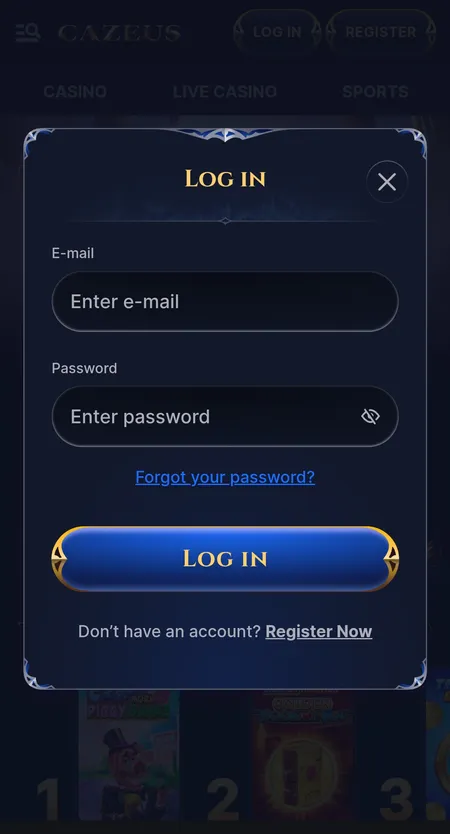
Cazeus Casino login modal with email and password fields

The login modal shows fields for email and password, a 'Forgot Password' link, the Log In button, and a link to create a new account.

Step-by-Step Login Process

Signing in takes under a minute if your credentials are correct.

  1. Click the Log In button in the top-right corner of the site.
  2. Enter the email address you used during registration.
  3. Type your password in the second field.
  4. Click the Log In button inside the modal to confirm.
  5. The page reloads with your balance and profile visible in the header.

If you want the browser to remember your session, make sure you are not in incognito mode and have not blocked cookies for the site.

Go to Cazeus Casino

Login Form Structure

The Cazeus sign-in form is a compact modal window with the following elements:

Field or Element Purpose
Email field Your registered email address
Password field Account password (masked by default)
Forgot Password link Opens the password recovery flow
Log In button Submits credentials and starts the session
Register link Redirects to account creation if you have no account

There is no username or phone number option in the current web form - email is the primary identifier. Once you are signed in, the header switches from showing Register/Login to showing your balance and a Deposit button.

Password Recovery

If you cannot remember your password, use the built-in reset flow.

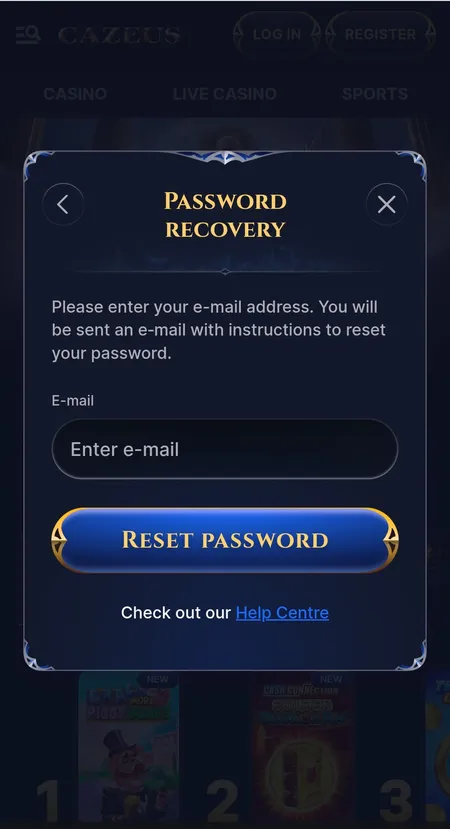
Cazeus password recovery modal with email input

Enter your registered email to receive a password reset link. The modal also links to the Help Centre for additional support.

Click Forgot Password inside the login modal. Enter the email address linked to your account and press Reset Password. Cazeus will send a reset link to that address. Follow the link, set a new password, and log in with the updated credentials.

If the email does not arrive within a few minutes, check the spam or promotions folder. If the address is no longer accessible, contact support via live chat or email - the team will verify your identity through other means before restoring access.

Register at Cazeus

Common Login Problems and Quick Fixes

Most login issues fall into one of four categories:

  • Wrong password - the most frequent cause. Use the reset link immediately rather than guessing repeatedly.
  • Wrong email - if you have multiple addresses, try each one associated with online accounts.
  • Browser cache or cookies - old session data can conflict. Clear cache and cookies, then reload the page.
  • Account blocked - after several failed attempts the system may temporarily lock the account. Wait a few minutes or contact support.

Switching to a different browser or disabling VPN can also resolve connection-related errors. If a specific error code appears on screen, copy it before reaching out to the support team - it speeds up diagnosis.

✕

Cazeus Casino allows one account per person. If a second account is detected on the same household or device, both may be restricted. Always check you are signing in to your original account before creating a new one.

Session Persistence and Auto-Login

When you log in through a standard (non-incognito) browser tab, Cazeus stores a session cookie that keeps you signed in between visits. The session remains active as long as you do not clear your browser data, log out manually, or stay idle for an extended period.

If you frequently use a shared or public computer, always click Log Out after each session. The logout option is found inside your profile menu in the top-right area once you are signed in.

Open Your Account

Logging In on Mobile

Cazeus is fully optimised for mobile browsers - Chrome and Safari on both Android and iOS work without issues. The login flow is identical to the desktop version: tap the Log In button in the top bar, enter your email and password, and confirm.

For faster daily access, Cazeus offers a Create Shortcut feature that adds a PWA-style icon to your home screen. On Android, use Chrome's 'Add to Home Screen' option. On iOS, tap Share in Safari and select 'Add to Home Screen'. The shortcut opens the site directly, behaving like a native app without requiring a download from any app store. More details are available on the Cazeus Casino mobile app page.

Security of Your Login

Cazeus protects the login process and all subsequent traffic with SSL encryption. In practice this means:

Security Layer What It Does
SSL / HTTPS Encrypts data between your browser and the server
KYC verification Confirms identity before large withdrawals
Session cookies Expire on logout or browser data clear
Anti-fraud monitoring Flags unusual login locations or patterns

For maximum account safety, use a unique password that you do not reuse on other sites. Avoid logging in over public Wi-Fi without a trusted VPN. If you receive an unexpected email about a login or password change, contact Cazeus support immediately.

✓

All login sessions on Cazeus Casino are encrypted via SSL. Your credentials are transmitted securely and are never stored in plain text.

What You Can Access After Login

Once inside your account, you can:

  • View your real-money and bonus balance
  • Browse the full Cazeus Casino games library - over 8,000 titles including slots, live casino, and table games
  • Open the Cashier to deposit or request a withdrawal
  • Check active bonuses and wagering progress in My Bonus
  • Review full transaction and betting history
  • Adjust security settings and personal details
  • Access VIP status and Challenges

Without being logged in, most of these sections are either hidden or locked. Demo mode for certain slots may be available without an account, but real-money play and bonuses require full authentication.

Play at Cazeus Now

Login and KYC Verification

Cazeus applies KYC (Know Your Customer) checks in specific situations - primarily before processing withdrawal requests or when account activity triggers a review. Standard documents requested include a government-issued ID, proof of address, and sometimes confirmation of the payment method used. Once all documents are submitted, verification typically takes 24-48 hours.

Logging in itself does not require prior KYC completion, but access to withdrawals will be gated until the check is passed. If verification is pending, a notification usually appears in your profile dashboard.

Logging Out Safely

To end your session, open the profile menu from the header and select Log Out. This clears the active session on that device. If you suspect someone else has access to your account, change your password immediately and contact support to review recent login activity. The support team is reachable 24 hours a day via live chat.

Return to the Cazeus Casino home page any time to sign back in and pick up where you left off.

FAQ: Cazeus Casino Login

How do I log in to Cazeus Casino?

Click the Log In button in the top-right corner of the site, enter your registered email and password, then press Log In inside the modal window.

What should I do if I forgot my password?

Click 'Forgot Password' in the login modal, enter your email address, and follow the reset link sent to your inbox. Check spam if the email does not arrive within a few minutes.

Can I log in with a phone number instead of email?

Currently the login form uses email as the primary identifier. Phone number login is not listed as a separate option in the current interface.

Why is my password not working even though it is correct?

Clear your browser cache and cookies, then try again. If the issue persists, use the password reset link or contact support via live chat.

How do I log in on my phone?

Open the site in your mobile browser (Chrome or Safari), tap Log In in the top bar, and enter your credentials. You can also add a shortcut to your home screen for faster access.

Does Cazeus Casino have two-factor authentication?

Account security includes session-based protection and KYC checks. For current 2FA options, check your profile security settings or ask the support team via live chat.

Can I stay logged in between visits?

Yes. In a standard browser session with cookies enabled, the session persists until you log out manually or clear browser data.

What happens if I enter the wrong password too many times?

After multiple failed attempts the system may temporarily restrict login. Wait a few minutes before trying again, or use the password reset option.

How do I log out from all devices?

Contact Cazeus support via live chat and request a full session reset. They can invalidate active sessions across all devices after verifying your identity.

Can I access my account without completing KYC?

You can log in and play without KYC, but withdrawals will be held until identity verification is complete. Submit documents early to avoid delays.